

You can able to make your Pendrive bootable in a couple of minutes. However, you can able to use Windows vista, 7 and 8. without any type of software You can’t able to use it with Windows 10. It is very simple to do follow the steps carefully.
- First Open Command Prompt as an Administrator.
- After opening CMD, enter this command disk part then press enter key
- Then it will show you some information about your PC. After you should have to enter another command list disk then press enter key
- Now, it will show about connected disks. Then enter next command there select disk 1(keep in mind there is only one pendrive is attached to the computer),then press enter key
- you must clean your drive, so enter new command there clean then press enter key
- Until the Step5,just it is initizating, now the real task begin...,Enter command create partition primary,then press enter key it will create a partition in the selected Pendrive.
- Enter new command here select partition 1 then press enter key and then enter another command active and then press enter key to activate the partition.
- Now format your USB Drive by Enter this command format fs=fat32 quick or format fs=ntfs quick and press enter key You can able to see progress in percentage.
- Enter this command assign and hit enter, Then type exit for ending disk management program.
- The last step is that you have to copy all windows files to USB Drive.

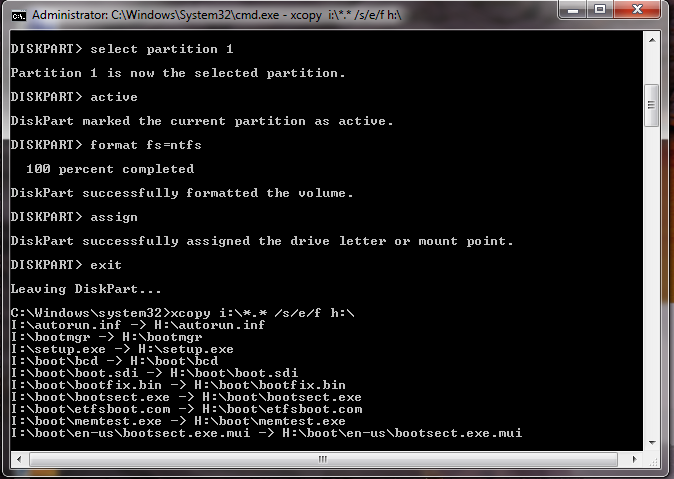
Thats all you pendrive became bootable!!!!!!


without software you can repair only soft deleted file but if you want to recover permanently deleted file you recovers your files and folders with the help of pen drive recovery tool.
ReplyDeletePkDomain is the best Web Hosting Company in Pakistan. We are provided Domain Registration and web designing, Web Hosting, Reseller Hosting, Dedicated Server and VPS Hosting you can also buying at affordable price. Give your business an online presence with us today at PK Domain. .pk domain renewal
ReplyDeleteanyone need maps or gps devices for pakistan … check out the web site
ReplyDeletePerson Tracker Toolkit | Check any number ownership, name and details